
The riskiest word on your cyber insurance questionnaire might be "Yes."
The renewal usually starts with an email from your broker and a PDF to return by month-end. Somebody forwards it to whoever handles IT, which in a lot of Montreal offices means the office manager, the controller, or the one person who knows where the router is.
Question 14 asks whether multi-factor authentication is required for remote access and administrative accounts. MFA is definitely on for Microsoft 365, because everyone grumbled about the Authenticator app for a week when it went live. So the box gets a confident tick.
That tick has a history. In 2022, Travelers asked a U.S. federal court to rescind a cyber policy issued to International Control Services (ICS), whose application had answered Yes to MFA for email, remote access and administrative access. After a ransomware attack, Travelers alleged it found MFA protecting only the firewall. The two sides then agreed to void the policy, so no court ever ruled on whether ICS had misrepresented anything. It's a U.S. case with no bearing on Quebec law. It does show what can happen when the form and the environment behind it drift apart.
Your cyber insurance questionnaire is a terrible place to discover what your IT actually looks like. The rest of this article is about finding out before the form arrives.
An insurer pricing a cyber policy can't send someone to walk through your server room, so the questionnaire does the walking. It's trying to establish whether a handful of basic controls are actually in place, such as MFA, endpoint protection, backups and limits on administrative access.
Your answers also become part of what the insurer relies on when it issues the policy, which is why this article treats the questionnaire as an IT exercise. (Coverage and pricing belong to your broker. None of this is insurance or legal advice.)
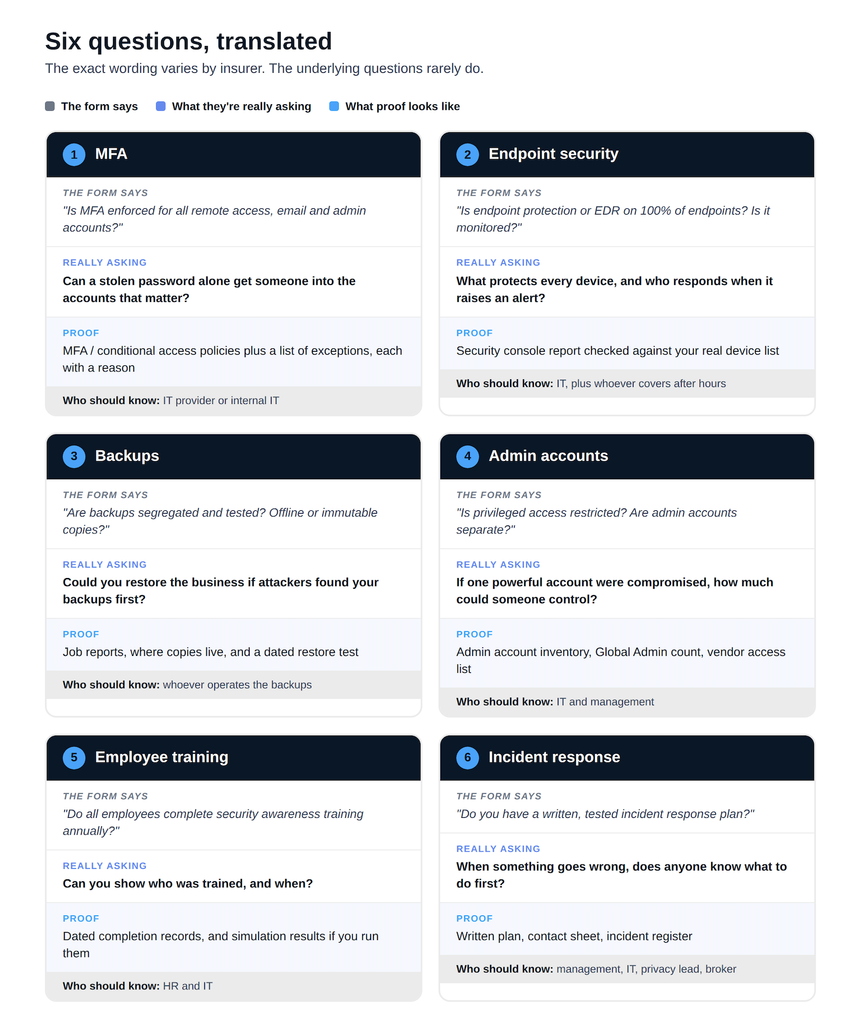
The form says: "Is MFA enforced for all remote access, email, and privileged or administrative accounts?"
What they're really asking: If someone buys one of your employees' passwords on a forum tonight, what stops them from logging in tomorrow?
The trap is the word "all." Plenty of businesses have MFA on their Microsoft 365 mailboxes and nothing on the VPN, the remote desktop gateway the accountant uses at tax time, the firewall's admin page or the backup console. Emergency "break-glass" admin accounts are often excluded on purpose and then forgotten. Some forms may also ask what kind of MFA you use. SMS-based authentication does not provide the same phishing resistance as passkeys and hardware security keys. We covered that shift in Microsoft Is Moving to Passkeys. What Does That Mean for Your Business?
Who should know: your IT provider or internal IT team, who can pull the sign-in policies and the list of excluded accounts.
What proof looks like: an export or screenshot of your MFA and conditional access policies, a list of exceptions with a reason beside each one, and confirmation for any remote access tools that sit outside Microsoft 365.
The form says: "Is endpoint protection or EDR deployed on 100% of endpoints and servers? Is it monitored?"
What they're really asking: What is protecting every computer in the company, and does anyone notice when it raises an alarm?
Traditional antivirus looks for known bad files. EDR (endpoint detection and response) watches behaviour, such as a spreadsheet suddenly launching PowerShell, and can cut a machine off from the network. Insurer wording varies, so answer the question your form actually asks.
The harder word is "100%." Think of the reception PC running the door buzzer software, the owner's personal laptop that also opens the company inbox, the old server nobody touches because the accounting software lives on it, or the remote employee's desktop in Laval that hasn't checked in since spring. Each one counts, and each tends to be missing from the dashboard.
Coverage is only half the question. If the platform raises an alert, someone needs to be responsible for seeing it and responding.
Who should know: IT, through the security console. Management should know who responds after hours.
What proof looks like: a device report from the security console checked against your actual asset list (that comparison is where the surprises turn up), plus the name of whoever watches alerts.
The form says: "Are backups segregated from the network and tested regularly? Do you keep offline or immutable copies?"
What they're really asking: If ransomware took your whole network tonight, could you get the business running again without paying?
Attackers know backups stand between them and a payment, so they go looking. A USB drive that stays plugged into the server, or a backup system that signs in with the same domain admin password as everything else, can be compromised along with the systems it's supposed to help recover. "Immutable" means a copy that can't be changed or deleted for a set period, even by an administrator. "Offline" means disconnected entirely.
Then comes testing. A backup you've never restored is a hope with a nightly schedule attached. Ask when someone last restored a full server or a real mailbox, and how long it took.
Microsoft 365 deserves its own line on your list. Microsoft provides substantial built-in resiliency and recovery capabilities, but those aren't the same thing as having a backup strategy designed around your own recovery requirements. We'll tackle that question separately in an upcoming article.
Who should know: whoever operates the backups, whether that's your IT provider or someone in-house.
What proof looks like: backup job reports, a plain description of where copies live and how they're separated, and a dated record of the last restore test.
The form says: "Do you restrict and monitor privileged access? Are administrative accounts separate from standard user accounts?"
What they're really asking: If one powerful account were compromised, how much of your business could someone control?
Access sprawl builds up quietly. The owner was made a Global Admin in 2019 "just in case." The former IT coordinator's Microsoft 365 account was disabled, but an old local administrator account they used still works on the firewall. A software vendor left a permanent remote-access tool on the accounting server during an install three years ago. The phone system provider and the website developer each have a login somewhere too, and so, oddly often, does the copier company.
A good answer starts with a list: every account with admin rights, internal or external, and the reason it needs them. People who do admin work should use a separate account for it and a normal one for email and browsing, so a phishing click lands on the weaker account.
Who should know: IT for the technical inventory; management for deciding which vendors should still have access.
What proof looks like: a current list of admin accounts, the number of Global Admins in Microsoft 365, and a vendor access list with the date it was last reviewed.
The form says: "Do all employees complete security awareness training at least annually? Do you run phishing simulations?"
What they're really asking: Would your staff spot a fake invoice or a spoofed email from the boss, and can you show you've prepared them?
Forms differ here: some ask about simulations, others only about training. The answer that holds up is a record of what training you provide, who completed it and when, and who hasn't. The June new hire who skipped the onboarding module counts.
Who should know: HR usually owns the records, and IT usually runs the training platform.
What proof looks like: dated completion reports, and simulation results if you run them.
The form says: "Do you have a written incident response plan? Has it been tested?"
What they're really asking: When something goes wrong at 7:40 on a Tuesday morning, does anyone know what to do first?
A usable plan fits on a few pages. It names who declares an incident, who calls whom, how you reach people if email is down, and where those contact details are stored if your normal systems aren't available. It should also note who your policy requires you to contact after an incident, and whether the policy specifies or provides breach-response, legal or forensic resources.
Quebec adds its own layer. Under the province's private-sector privacy law, as amended by Law 25, businesses must keep a register of confidentiality incidents. When an incident involving personal information presents a risk of serious injury, they must promptly notify the Commission d'accès à l'information and the people affected (LégisQuébec, P-39.1, ss. 3.5 and 3.8). Your plan should name who handles that.
Who should know: management, IT, the person in charge of the protection of personal information, and your broker.
What proof looks like: the written plan, a contact sheet, your incident register, and notes from a tabletop exercise if you've run one.
Whatever the full facts were in the ICS case, the dispute centred on a gap between the application and what the environment looked like after an attack. That gap is where guessed answers live.
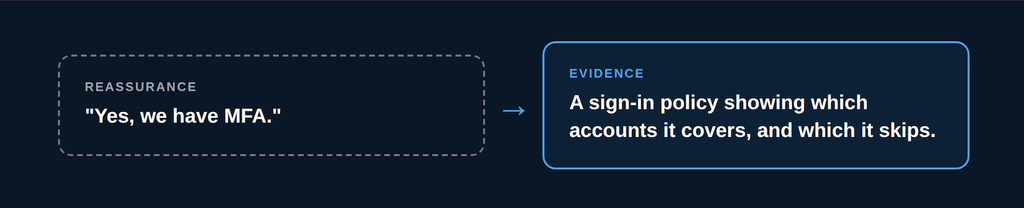
Most people filling out these forms are honest, but they're relying on reassurance. A colleague saying "yes, we have MFA" is reassurance. A sign-in policy showing which accounts it covers, and which it quietly skips, is evidence. The questionnaire deserves the second kind.
If a control is only partially implemented, don't turn that into a Yes or No on your own. Establish exactly what is in place and ask your broker how the question should be answered.
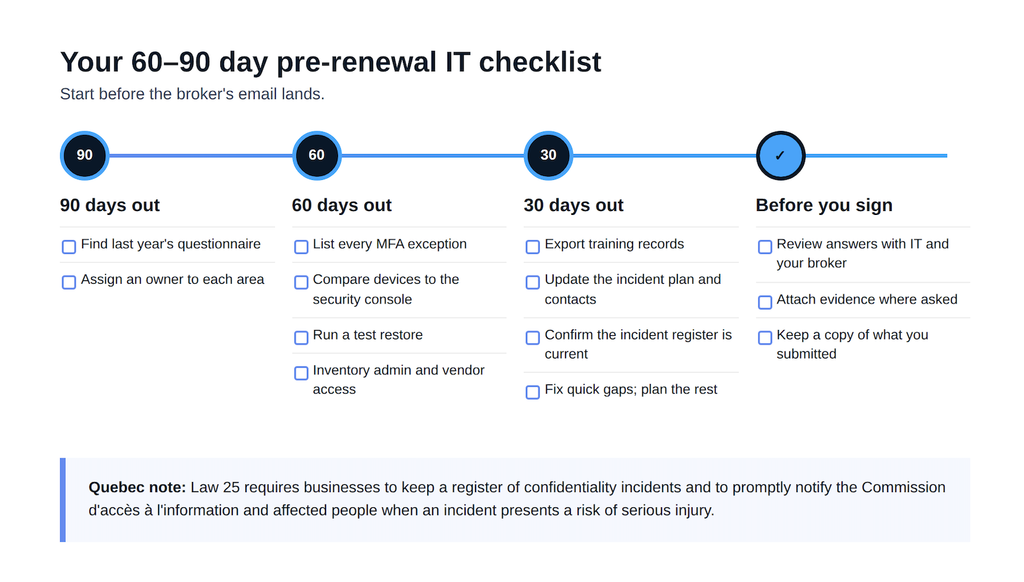
Start before the broker's email lands. Three months is enough time to fix small gaps and document the bigger ones.
90 days out
60 days out
30 days out
Before you sign
A cyber insurance questionnaire can expose gaps, but it shouldn't be the first time your business discovers them.
If you can verify where MFA is enforced, which devices are protected, whether backups can be restored and who has administrative access, the questionnaire becomes much easier to answer accurately.
More importantly, you have a clearer picture of the IT environment your business relies on every day.
If you'd like a second set of eyes before your next renewal, Syslogic can go through the questionnaire with you and check each answer against what's actually running in your environment. Talk to Syslogic about a pre-renewal IT review.

