
The employee told you they clicked. Your first response matters.
Thank them, then work quickly. A full, accurate account of what they did is what lets IT size the response, and someone who expects blame has less reason to give one.
If you only have two minutes:
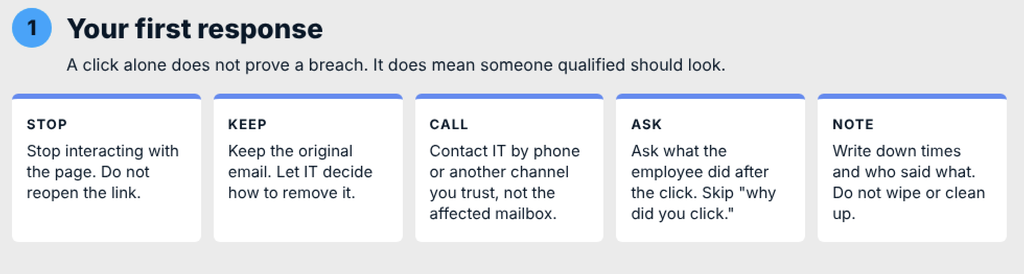
A click alone does not prove that your business has been breached. It does mean someone qualified should look.
Keep the original message. It holds the sender, the link and the headers IT can use to see who else received it and where the link leads. Deleting it does not necessarily destroy every copy, but it can make the work harder, so let IT decide how to remove it.
Ask the employee for a plain account of what they saw, typed, approved and did next. Skip "why did you click," because it gets you nothing IT can use. Don't wipe the device or improvise a cleanup either. Follow IT's instructions on isolation and evidence.
The right response depends on what the employee did. You are not diagnosing the attack. You are giving IT an accurate account so they can respond in proportion.
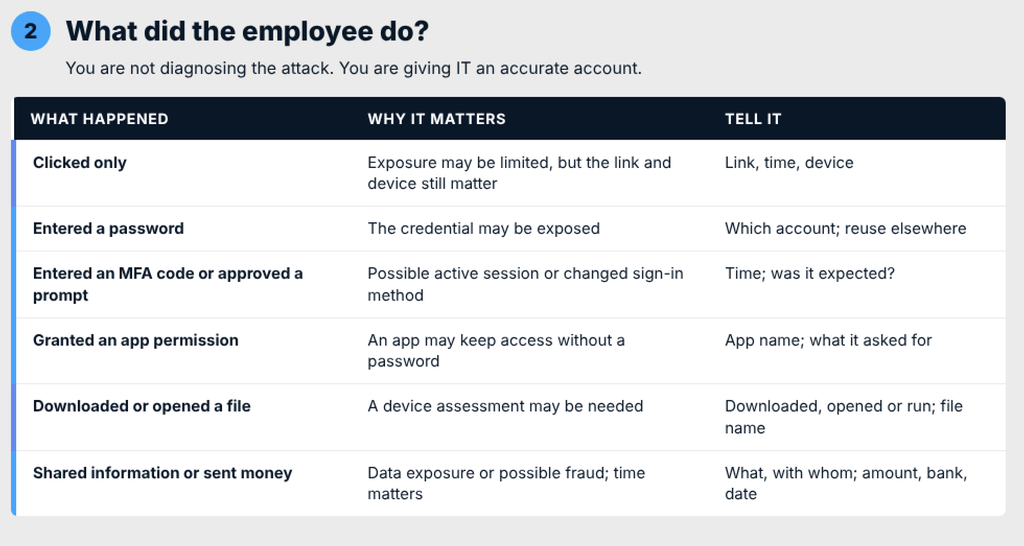
If the employee is unsure, say so. IT can work from "I think I typed my password" better than from a confident guess.
IT should coordinate containment, because the right steps depend on what was exposed and covering each outcome matters more than following a fixed order.
Depending on the case, IT may temporarily block sign-in while they investigate. Microsoft's guidance for a compromised account includes disabling it during the investigation alongside other recovery measures. IT should also revoke sessions and check whether connected applications require separate action to remove access, because changing a password does not necessarily end a session that is already open. They will review the account's sign-in methods for anything the employee does not recognize and check which applications have been granted access.
One thing does not belong on that list: a new password emailed to the employee. If the mailbox may be compromised, the person you are trying to lock out can read it. Microsoft advises against emailing a new password to a potentially compromised account. Agree on a trusted channel in advance, such as a phone number or a chat tool outside the affected account, and use it for anything involving recovery credentials. Microsoft's guidance on responding to a compromised email account covers the technical side.
If only a link was clicked and nothing was entered, IT may reasonably decide an account reset is unnecessary. That decision should be theirs, and it should be recorded.
A single sign-in can leave traces in several places, and a downloaded file can mean a device problem as well as an account problem. These are separate questions. A clean antivirus scan on the laptop does not clear the cloud account, and a secured account does not clear a device that ran a file.
IT will look at where and when the account has signed in and whether a new device or sign-in method was registered. Unfamiliar locations need interpretation, since VPNs and mobile networks can produce misleading ones. If a file was run, IT may isolate the device until it is assessed. Ask the employee to list every device and browser where they are signed in to work accounts, including a personal phone.
Start with the employee's manager and IT, then widen the circle only as far as the facts require.
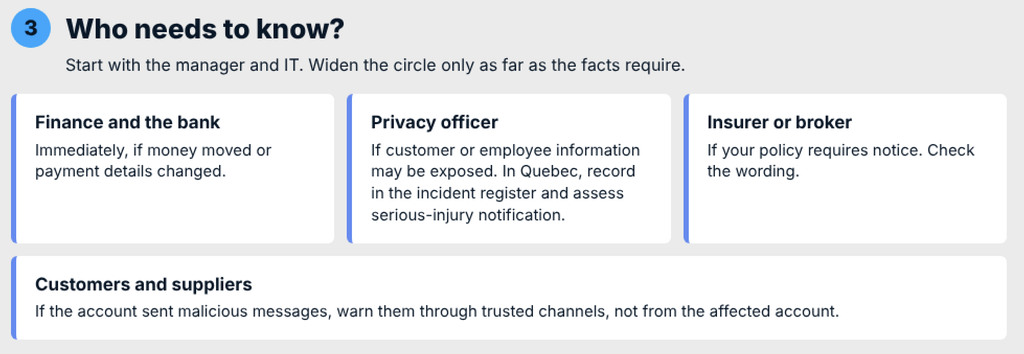
In Quebec, a confidentiality incident involving personal information has two separate consequences. Every such incident belongs in the business's incident register, including minor ones. Notifying the Commission d'accès à l'information and the affected people is required when the incident presents a risk of serious injury. By default, the person with the highest authority in the business holds this responsibility, unless the function has been delegated in writing, and the business remains responsible for meeting its obligations. A suspicious click alone does not establish a reportable incident. IT's findings help the responsible person assess whether personal information was affected and whether the threshold is met.
The question here is what actually happened and who or what was affected. It reaches beyond the mailbox, because a compromised Microsoft 365 identity can expose the associated mailbox, SharePoint and OneDrive.
IT will typically look at:
Some of these answers depend on logs, and logs have limits. Retention periods, licence levels and the settings in place before the incident all affect what can be established.
An incident is over when four things are true. "We changed the password" is only the start of the second.
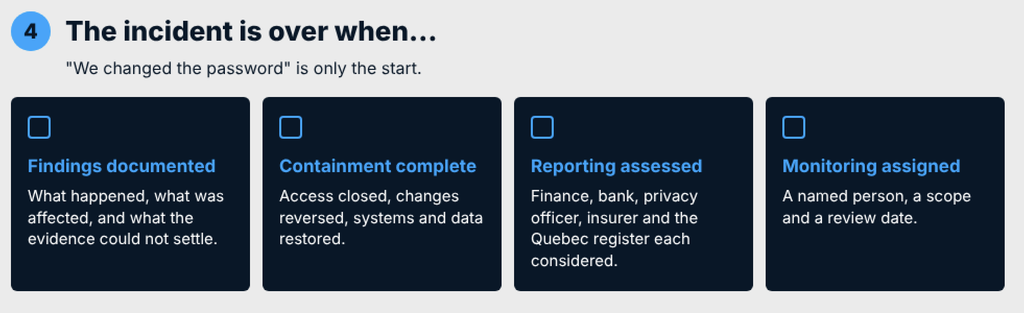
Hold a review that focuses on what happened and what would prevent a repeat. Include the employee without turning the discussion into blame.
Here is a checklist you can copy into that plan.
| Action | Owner | Done when |
|---|---|---|
| Collect the employee's account | Manager | Notes with times are written down |
| Contact IT through a trusted channel | Manager or employee | IT has the notes and confirms receipt |
| Address suspected unauthorized access and assess the device | IT | Access concerns addressed; device assessment completed or escalated |
| Report fraud if money moved | Owner or finance lead | Fraud reported, reference recorded, next actions confirmed |
| Investigate the impact | IT | Findings and evidence limits are documented |
| Assess reporting obligations | Privacy officer and owner | Decisions and reasoning are recorded |
| Set up monitoring | IT with the owner | Named owner, scope and review date established |
If a click has already happened and you want help assessing and responding, contact Syslogic.

