The office VPN goes down at 9 a.m. Sales keeps answering email and joining Teams calls. In finance, payroll comes to a halt, because the payroll software still needs to reach a server at the office.
Before you renew the VPN, ask what work stops when it goes down. The answer can vary by team, even in a ten-person business.
Teams that work entirely in cloud services such as Microsoft 365 may not need to connect back to the office at all. Staff who depend on private systems, like that payroll server, still need a secure way to reach them, and for some of those workflows a VPN may still be the simplest option.
A work VPN creates an encrypted connection between an employee's laptop and a VPN gateway, usually a firewall or dedicated device at the office. Once connected, the laptop can reach resources that would otherwise stay private, such as a file share or an accounting database. The Canadian Centre for Cyber Security's VPN guide explains how they work and what to consider when securing one.
What the employee can reach depends on how IT configured the VPN. One group might reach only the accounting server while another reaches most of the office network. If you've had the same VPN for years, ask which arrangement you have.
The setup made sense when the office held everything: shared drives on a server in the back room, the accounting software on a tower under someone's desk. Working from home meant connecting back into the building.
Outlook, Teams and SharePoint sit on the Internet by design. An employee at home signs in to them directly with a work account and, depending on your sign-in policies, MFA or a company-managed laptop. The office network isn't part of the trip, which is why sales barely noticed the outage.
Payroll is different. In this example, the payroll software is installed on an office server, and each finance laptop has to reach that server to run it. One system left behind was enough to stop a whole team.
Bring a short list of what still runs through the VPN to the decision. These four examples show why it doesn't always split neatly into "cloud" and "office":
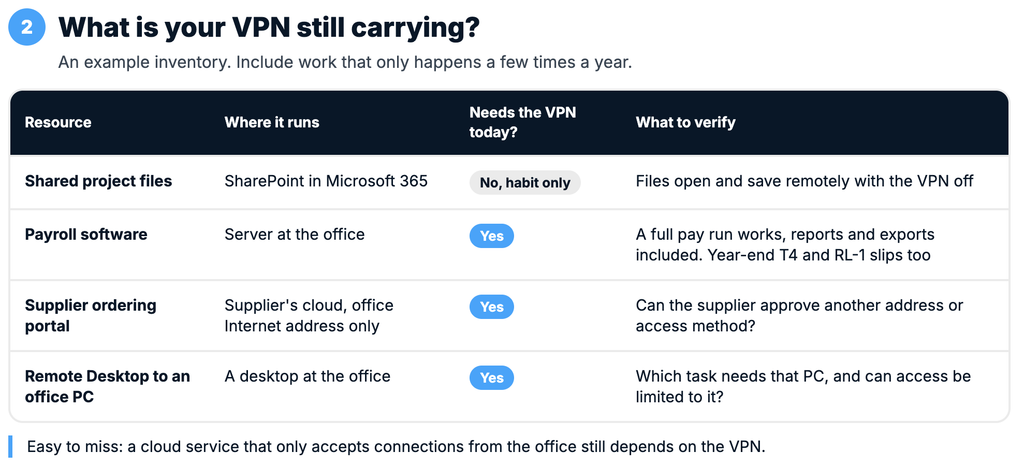
The supplier portal is easy to miss. It lives in the cloud, yet purchasing still needs the VPN because the supplier only trusts connections from the office.
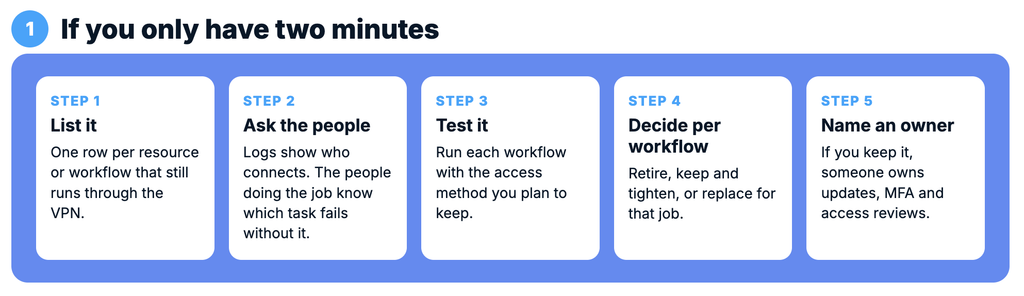
Start with the VPN's connection logs. They show which accounts connect and when, but they usually say little about what each person did, and a quiet month can miss year-end accounting, occasional vendor support or emergency admin work. Then ask the people who do each job which task fails when the VPN is off. Asking who "uses" the VPN gets you everyone who switches it on every morning.
Finally, test each workflow using the access method you plan to keep. For SharePoint, that may mean simply turning the VPN off. For payroll, it means carrying a hosted version or a new access setup through a full pay run, reports and exports included. A successful sign-in says little about whether finance can finish the job.
Zero trust is an approach to access. Being on the office network doesn't grant permission by itself; access depends on policies about the user, the device and the resource they need. NIST's Zero Trust Architecture guide (SP 800-207) describes the approach in detail. Zero trust network access (ZTNA) is one way to put those policies into practice.
For payroll, a policy might read: members of the finance group, signed in with MFA, on a company-managed laptop that meets update requirements, may reach the payroll server and the services it needs. A personal tablet wouldn't qualify. Neither would a sales laptop. How often those conditions get rechecked during a session depends on the product and how it's set up.
The catch is the software. An older payroll program may also need a database, a file share and a licence server, and each one has to be identified, allowed and tested. A pilot with one workflow, carried from sign-in to a finished pay run, is the sensible first step.
A legacy application that works reliably over the VPN, or a handful of staff who need a few private systems, can make keeping it a reasonable decision.
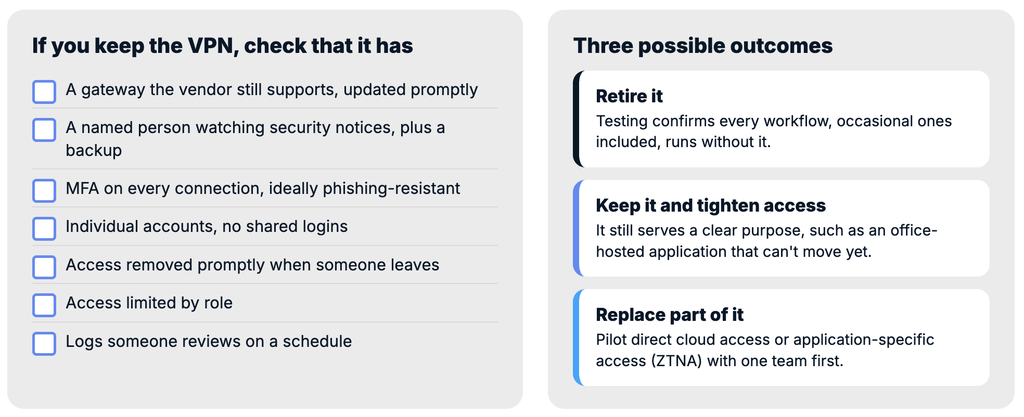
Keeping it does mean ongoing work. The gateway faces the Internet all day, and CISA and the NSA have warned that remote-access VPN servers are attractive entry points for attackers. A VPN worth keeping has:
Decide which devices can connect, too. A company-managed laptop and a personal computer give IT very different levels of visibility and control. If staff already use their own machines, our article on whether employees should use personal computers for work covers the questions to settle first.
Retire it when testing confirms that every workflow on your list runs without it, occasional ones included. Agree beforehand on how to restore access quickly if something surfaces after the change.
Keep it and tighten access where it still serves a clear purpose, using the checklist above.
Replace it for selected workflows by piloting direct cloud access or application-specific access, one workflow at a time, with the people who do the work.
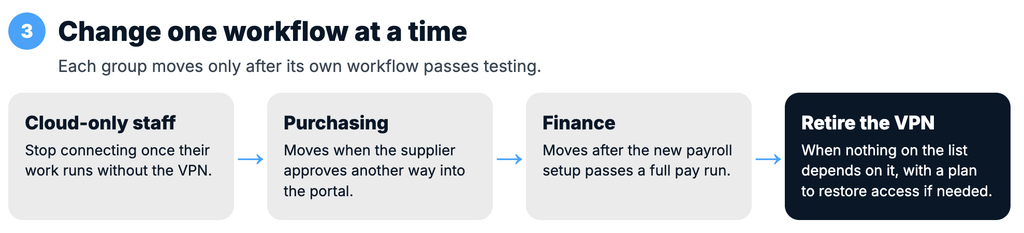
In this example, staff who only use Microsoft 365 can stop connecting once IT confirms their work runs without the VPN. Purchasing keeps its current access until the supplier approves another way into the portal. Finance keeps the VPN while IT tests the new payroll setup through a full pay run, including reports and exports. Once both teams can complete their work through the new connections, IT can plan to retire the VPN.
Bring these five questions to your next IT meeting:
If your renewal is coming up and the answers are fuzzy, Syslogic can help you inventory remote access and work alongside your IT team in Greater Montreal to test changes one workflow at a time.

