
Ask a small-business owner what they spend on IT and the answer may take some digging. The money sits across a Microsoft invoice, a few software subscriptions, a laptop bought the week the old one died and whatever the last support call cost. Before you can decide what to budget, it helps to see what you already spend, then add the equipment and projects those invoices leave out.
A useful starting calculation is:

Your total will depend on how the business operates. One office with simple cloud applications has different needs from several sites with specialist software and equipment that cannot stop during working hours.
Five categories help catch omissions:
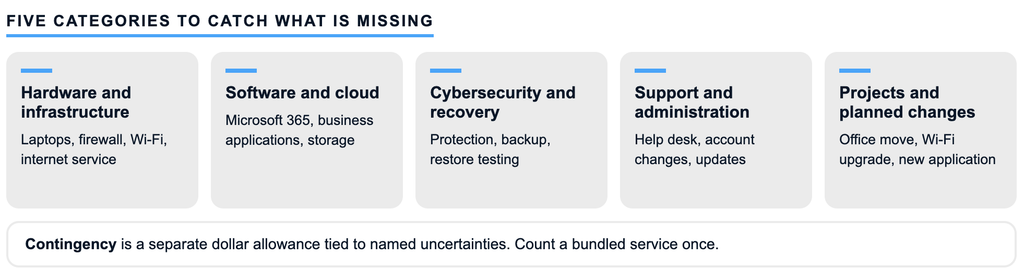
Contingency is its own line, outside the five.
Some services bundle categories. If your support agreement includes endpoint protection, record the fee once, where the invoice line sits, and note what it covers. If another department carries a software cost, show the allocation so it stays visible without being counted twice.
For a first pass, collect invoices, card statements, subscription records, equipment lists and support agreements, and ask department managers which tools they buy directly. Design applications and booking platforms can sit outside the expenses labelled "IT."
Per-user lines follow headcount. Someone joining in July needs about six months of service that calendar year, plus a computer, setup and training. Shared costs such as the firewall or internet connection get their own lines.
The example imagines a 12-person office. All figures are invented planning assumptions in Canadian dollars, before tax. They show the arithmetic and are not market benchmarks, a Syslogic quote or a recommended spend per employee.
Assumptions:
| Line | Category | Illustrative basis | Annual (CAD) |
|---|---|---|---|
| Microsoft 365 licences | Software and cloud | 12 users x $30/month x 12 | 4,320 |
| Other business software | Software and cloud | assumed total | 3,000 |
| Endpoint protection | Cybersecurity and recovery | 12 devices x $6/month x 12 | 864 |
| Email security and backup | Cybersecurity and recovery | 12 users x $8/month x 12 | 1,152 |
| Support and administration | Support and administration | $1,000/month x 12, scope above | 12,000 |
| Onsite visits and device setup | Support and administration | assumed total | 1,500 |
| Internet and network subscriptions | Hardware and infrastructure | $150/month + $600/year | 2,400 |
| Annual recurring costs | 25,236 | ||
| Scheduled equipment: 5 laptops due | Hardware and infrastructure | 5 x $1,600 | 8,000 |
| Office Wi-Fi survey and fixes | Projects and planned changes | assumed estimate | 2,500 |
| Contingency | Separate line | see the contingency section | 2,000 |
| Illustrative annual IT budget | 37,736 |
List laptops, desktops, docks, servers and network equipment with age, warranty, condition, assigned user and any application that depends on each device. Replacement timing depends on those facts, on software support and on the person's role, so a laptop used at client appointments deserves different attention from a spare monitor.
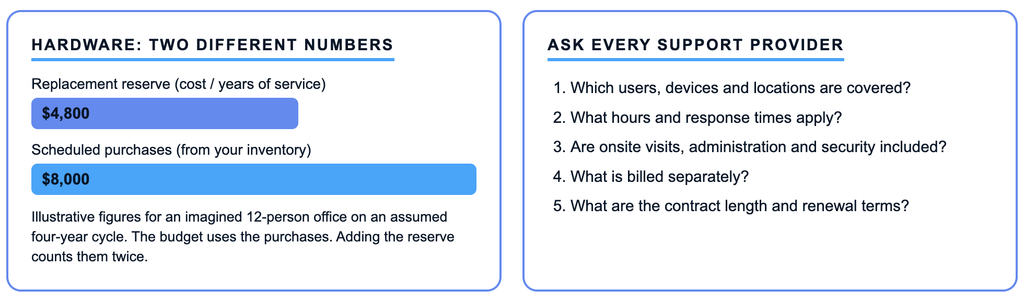
Two numbers matter. A replacement reserve divides purchase cost by expected years of service. In the example, 12 laptops at $1,600 on an assumed four-year cycle give $4,800 a year. Next year's cash need comes from the inventory: five laptops bought together come due together, so the schedule shows $8,000. The budget total uses the $8,000. Adding the reserve on top would count the same purchases twice.
Each purchase should include delivery, configuration, data transfer and secure disposal. Syslogic's article on Windows 10 at work covers how to inventory PCs that cannot upgrade.
For each subscription, record purpose, owner, quantity, renewal date, currency and commitment term. Compare purchased and assigned licences. Seats held by former employees are a place to look for savings.
Some subscriptions, Microsoft's among them, distinguish monthly from annual commitments, including annual terms paid monthly, so a monthly invoice may not let you cut seats every month. Check the terms before budgeting savings. Pricing can follow users, devices, storage or usage, and for usage-based services recent consumption is a better guide than the latest invoice multiplied by twelve. Document the exchange-rate assumption for US-dollar charges, and treat GST and QST consistently.
Begin with what the business would struggle to lose or expose, such as customer records, financial files and employee data, and how long you could operate without email, accounting or the phones. Those answers shape protection and recovery spending.
Check what existing licences already include. Someone still has to configure each capability and respond to its alerts, and that work belongs in the budget, along with time for restore testing. Insurance requirements are another input. Syslogic's cyber insurance questionnaire article explains how to establish what is in place, and your broker can answer coverage questions.
Common models are an internal employee, outside help billed per incident and an ongoing managed or co-managed agreement. Syslogic's article on managed IT versus break/fix covers the differences, so this section focuses on comparing quotes. An employee brings salary, employment costs, tools, training and vacation coverage. Per-incident help needs an allowance for likely work. An agreement needs a clear scope. Ask each provider:
Montreal businesses should confirm onsite and French-language support requirements before comparing proposals. If an office manager acts as the IT contact, record that time, even when it already sits in payroll.
An office move, cloud migration, network upgrade or new application needs its own estimate and delivery window, covering planning, installation, data migration, testing and training. Ask whether old and new services will overlap and whether the estimate includes retiring the old system. For uncertain scope, record a range and the decision needed to narrow it.
Contingency is a dollar allowance tied to identified uncertainties, such as equipment without warranty, possible hiring, variable cloud usage or incomplete project estimates. Known replacements belong in the purchase schedule. In the example, the $2,000 covers three assumed uncertainties: a firewall past its warranty, an early laptop failure outside the planned five, and a Wi-Fi estimate that is not final. Record what your allowance covers and who may approve its use.
Before approving the total, check for licences held by former employees, onboarding costs, spare equipment, domain and certificate renewals, documentation and administrator access. Then copy the worksheet below. Record payment dates beside annual totals so renewals do not create a cash-flow surprise, and mark every gap. A first version with visible gaps is a good result, and gathering the information may take longer than the arithmetic.

Review actual spending quarterly, and again when hiring, locations or systems change. If you would like a second look at your assumptions, Syslogic can review your current services, equipment and planned changes with you. Bring the invoices and your questions, and Contact Syslogic.

